
Capture More Than Notes: Photos, Short Videos, Voice, Links, Screenshots & OCR
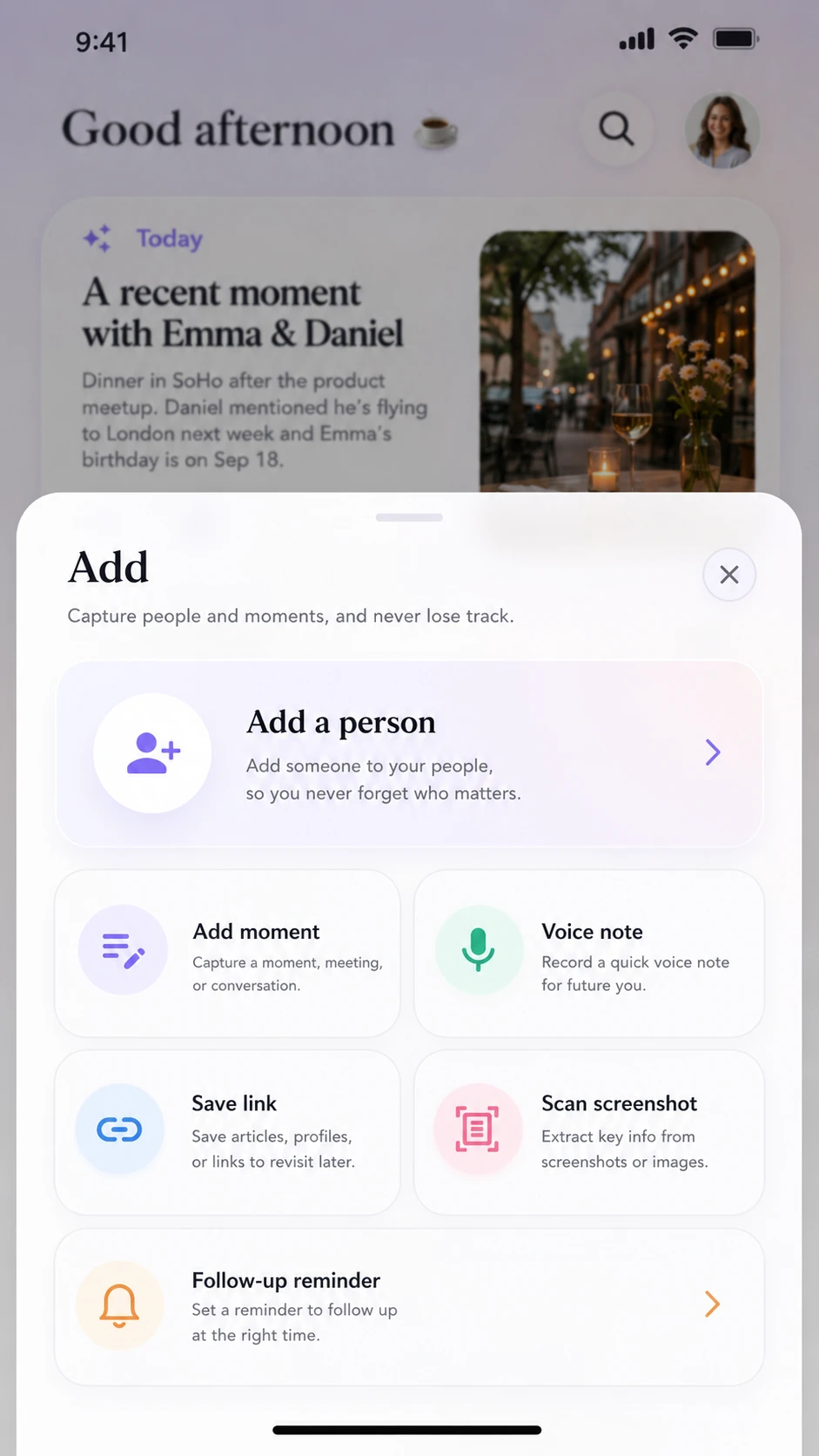
Relationship context does not always arrive as text. Relmory Moments can bring together notes, photos, short videos, voice, local speech-to-text transcripts, links, screenshots, and OCR-derived content so useful details can stay connected to the people they belong to.
In brief
Relmory Moments can preserve relationship context in multiple formats, including text, photos, short videos, voice notes, local speech-to-text transcripts, links, screenshots, and OCR-derived content. These different forms of information stay connected to the person and Moment they belong to instead of being scattered across unrelated apps.
Key facts
Useful context may arrive as text, a photo, short video, voice recording, link, screenshot, or information extracted from an image rather than as a traditional contact note.
Photos can stay connected to the person and Moment that give them meaning instead of becoming isolated images in a large photo library.
A short video can preserve experiences, demonstrations, environments, reactions, and other relationship context that may not be captured fully by text or a still image.
Voice notes can preserve thoughts while they are fresh, while local speech-to-text transcripts can make spoken information easier to review later.
Links and screenshots can remain connected to the conversation or person that made them useful instead of becoming disconnected browser history, bookmarks, or gallery images.
Relmory does not require every Moment to use the same format. The goal is to preserve useful relationship context in the form that makes the most sense.
Relationship memory is not only text
Real life is rarely that tidy.
A useful relationship detail might be a photo from a shared experience, a short video that captures a moment better than words, a voice note recorded while an idea is still fresh, a link someone recommended, or a screenshot containing information you want to keep.
Sometimes the fastest way to remember something is simply to preserve it in the form in which it originally appeared.
Relmory Moments are designed around that reality.
Instead of forcing every piece of relationship context into a text field, a Moment can bring different kinds of information together around the person and memory they belong to.
Use photos to preserve visual context
You might want to keep a photo from a shared experience, something a person showed you, a place you visited together, an item connected to a conversation, or another visual detail that helps the memory make sense later.
When a photo becomes part of a Moment, it is no longer just another image somewhere in a large photo library.
It has context.
It stays connected to the person, the Moment, and the reason you wanted to remember it.
Keep short videos when movement and sound matter
A short video can preserve an experience, demonstration, environment, reaction, or other detail that a still image may not fully capture.
The goal is not to turn Relmory into a general-purpose video library.
Short videos are useful when the video itself contributes meaningful relationship context and belongs naturally with a person or Moment.
By keeping that video with the surrounding memory, you do not have to rely on a filename or camera roll date to remember why it mattered.
Capture thoughts naturally with voice
After a conversation, meeting, or shared experience, speaking a quick voice note may be faster and more natural than stopping to write everything down.
Relmory can keep voice as part of a Moment, preserving the original recording alongside the relationship context around it.
Where local speech-to-text is available, a transcript can also make spoken information easier to review later without requiring the relationship memory itself to become dependent on a remote transcription service.
Voice is especially useful for thoughts that are worth capturing while they are still fresh.
Keep useful links close to the conversation
Someone recommends an article. You discuss a restaurant, product, book, project, destination, tool, or website. A collaborator sends a useful reference. You find something that you want to share with a person later.
If the link remains only in browser history, bookmarks, or a message thread, the relationship context around it can disappear.
Saving a link in a Moment keeps the reference close to the conversation or person that gave it meaning.
Later, you can remember not only what the link was, but why you cared about it.
Turn screenshots into useful relationship context
A screenshot might contain a recommendation, address, event detail, product, message excerpt, booking information, idea, or something else connected to a relationship.
Without context, it eventually becomes another image buried in the gallery.
Relmory lets screenshots become part of a Moment, where they remain connected to the person and memory behind them.
OCR-derived content can make information contained in a screenshot or image more useful by turning visible text into text that can be preserved and reviewed alongside the original visual context.
Choose the format that fits the memory
A sentence may be enough for one Moment. Another may make more sense with a photo. A short video may preserve something that would be difficult to describe. Voice may be the fastest way to capture a thought. A link or screenshot may already contain exactly the information you want to remember.
Relmory does not require every Moment to look the same.
The important part is not the media format.
It is that the useful context stays connected to the person and relationship it belongs to.
Capture what is worth remembering in the form that makes the memory easiest to keep and revisit.
Questions you may still have
These answers are maintained with this page and are also exposed as structured FAQ data.
What can I add to a Relmory Moment?
A Moment can bring together text, photos, short videos, voice notes, local speech-to-text transcripts, links, screenshots, and OCR-derived content. The format can depend on what you are trying to remember and which form best preserves the useful relationship context.
Why would I save a photo or short video in a Moment?
Photos and short videos can preserve visual, environmental, motion, or sound context that may be difficult to recreate with text alone. Connecting them to a Moment also preserves why the media mattered and which relationship it belongs to.
Can I use voice instead of typing a relationship note?
Yes. Voice can be a convenient way to capture a thought after a conversation, meeting, or shared experience when speaking is faster than typing. The voice recording can remain part of the Moment, and local speech-to-text can provide a transcript where available.
Why save a link in Relmory instead of a bookmark?
A bookmark remembers the destination, but it may not preserve the relationship context around it. Saving a link in a Moment helps retain who it was connected to, what conversation it came from, or why you wanted to remember it.
How can screenshots and OCR help with relationship memory?
A screenshot can preserve information quickly, while OCR-derived content can make visible text from an image easier to keep and review. When both remain connected to a person or Moment, the information is easier to understand later than an isolated screenshot in the photo gallery.